

Windows negative DNS cache: why clients still fail to resolve after the server recovers

After a brief internal DNS outage, the server side had fully recovered — yet a batch of Windows clients kept failing name resolution for several more minutes. Here’s the investigation.
Symptoms
- DNS server healthy again;
nslookup internal-app.corp.localworks when queried directly against the server; - But the application layer (browser,
ping) still reportscould not resolve; - Only clients that attempted resolution during the outage are affected; freshly booted machines are fine.
Root cause
The Windows DNS Client service caches more than successful lookups — failed results (NXDOMAIN / timeouts) get cached too. This is called negative caching. By default those failure records linger in the cache for a while, and during that window the system won’t even send a real DNS query.
You can see the negative entries with:
Get-DnsClientCache | Where-Object Status -ne 0nslookup works because it bypasses the DNS Client cache and queries the server directly — which is also why “nslookup works but apps can’t resolve” almost always points to the local cache or the hosts file.
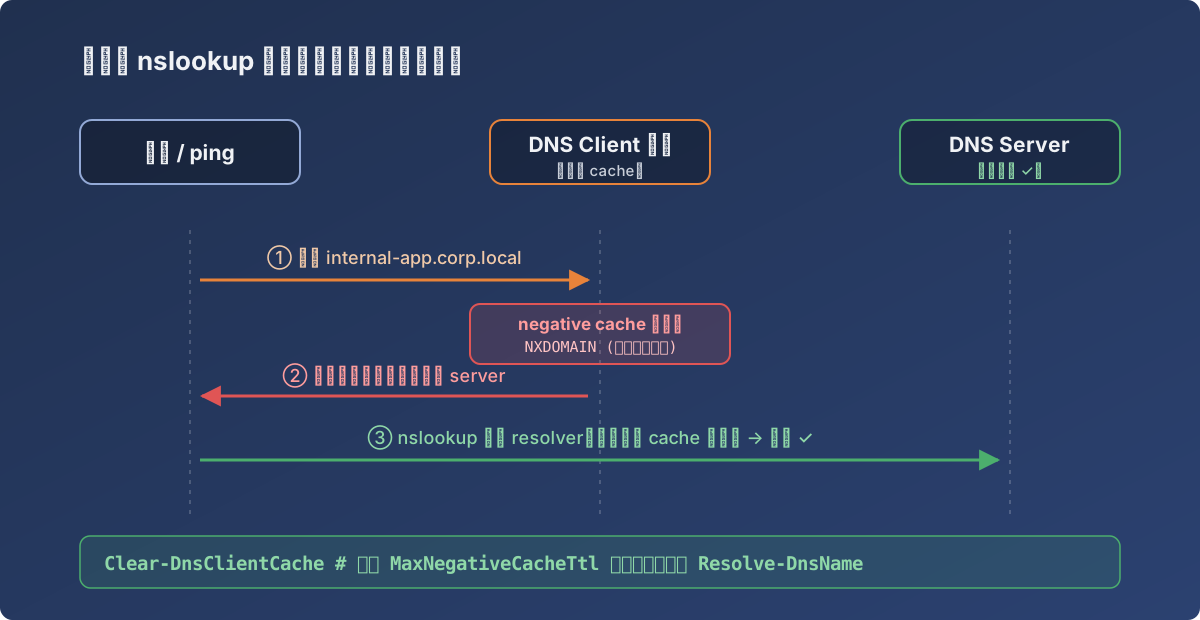
The app and nslookup take completely different paths
Fix
Immediate recovery on a single machine:
Clear-DnsClientCacheFor a batch of machines, push a remote command — or just wait out the TTL. The long-term option is shortening the negative cache retention (registry MaxNegativeCacheTtl), worth considering in environments where the DNS infrastructure itself is shaky.
Lesson
nslookupsucceeding ≠ system resolution working.nslookupuses its own resolver — always reproduce withResolve-DnsName(which goes through the system stack) to see what applications actually see.