

Synology Active Backup keeps failing on one machine: it's the firewall again

Synology Active Backup for Business handles scheduled PC backups for the whole company. All green — except one R&D machine that always failed.
Ask the network before the software
What made this machine special wasn’t its hardware or OS — it was the network it sat on. R&D gear lives on a dedicated lab SSID/subnet, isolated from the office LAN (which is the right call: lab equipment shouldn’t mingle with production).
Basic connectivity test between the NAS and the target: ping fails. No need to read agent logs — the answer was already in:
Backup traffic from the LAN (where the NAS lives) to the lab subnet had no allow policy on the firewall.
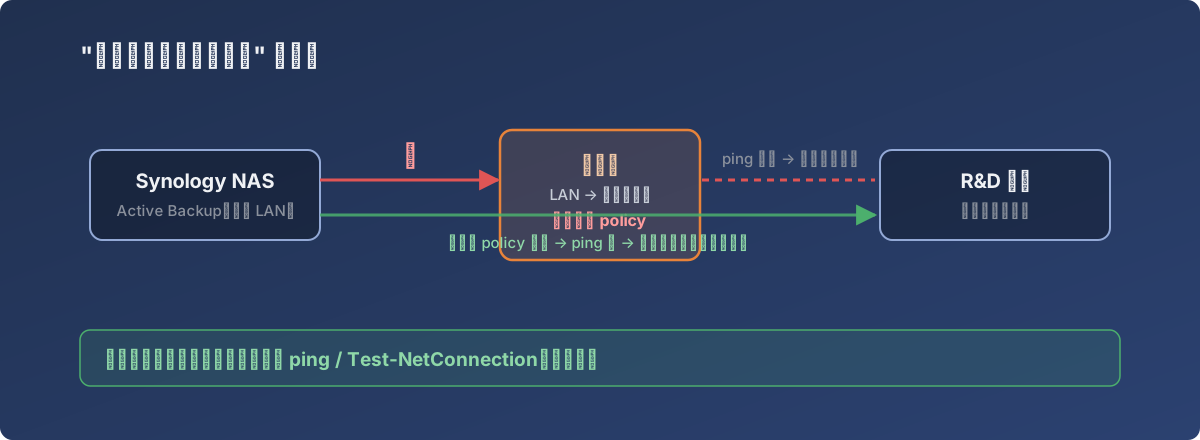
The whole ten-minute story: one missing policy, one added policy
The fix
Add the policy: allow backup traffic from LAN → lab subnet (source: NAS address, destination: lab network, ports per Active Backup’s requirements).
Verify immediately:
- NAS pings the target — reachable;
- Trigger a manual backup in Active Backup — success.
Ten minutes, end to end.
Why this is worth writing down
Because this failure class presents at the application layer while the root cause lives at the network layer — get the investigation order wrong and you burn hours: reinstalling agents, recreating backup tasks, combing NAS logs. All useless.
In any segmented environment, when “only this machine / only this group” misbehaves, the first question is:
What subnet is this machine on, and is the path to the server open?
One ping (and a Test-NetConnection -Port <port> if that fails) splits the problem between network and application — forever the cheapest first move.
Lessons
- Audit backup coverage by subnet: new subnets and new SSIDs can’t reach the backup server by default — the firewall policy has to follow;
- The better your segmentation, the more of these you’ll hit. It’s the price of isolation — worth paying, but put “backup connectivity” on the new-subnet checklist;
- “Exactly one machine fails” is the classic fingerprint of a network problem. Don’t touch the software yet.