

Three nights of silent backup failure: lessons from monitoring SAP B1 RSP

Our SAP Business One environment uses RSP (Remote Support Platform) for nightly backups of every company database. During a routine weekly check, Backup History showed something ugly: three consecutive nights, across multiple databases, every job DB Backup: Failed — with 0 B in the Size column.
Even better: three days later the backups quietly went back to succeeding, as if nothing had happened.
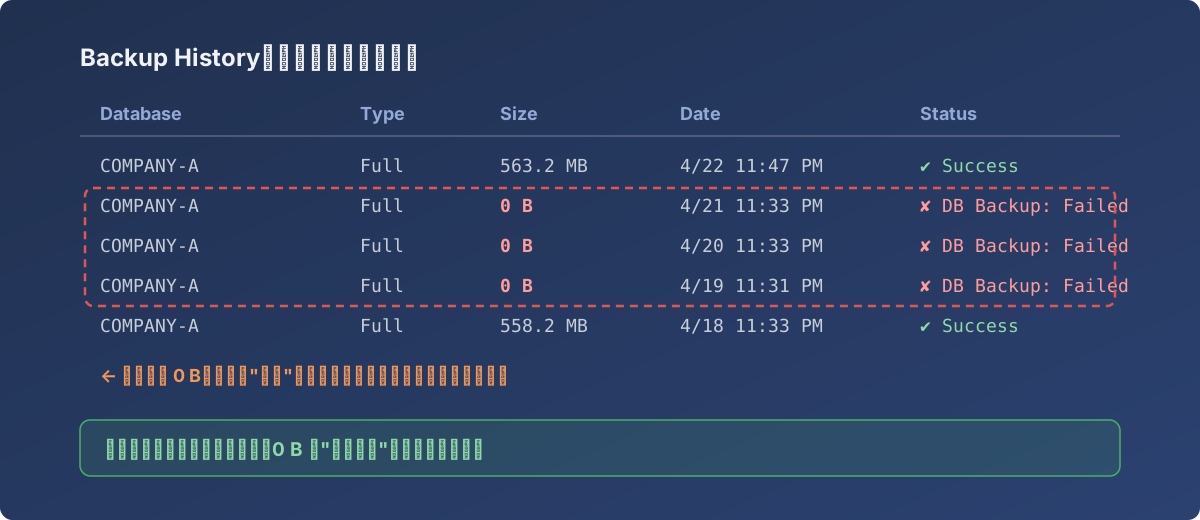
The pattern we found in Backup History (database names anonymized): a 0 B triple, then a silent “self-heal”
Why nobody knew for three days
Because it failed silently:
- RSP backup failures trigger no notification — the failed rows just sit quietly in the Backup History list;
- Our RSP’s E-Mail Connection had never been wired up (it shows grey in Connection Status), so the alert channel effectively didn’t exist;
- The backup folder held a row of 0 B files — it “looks backed up” while being unrestorable. That’s worse than an empty folder, which at least would raise eyebrows.
Had ransomware or a disk failure landed on one of those three nights, we’d have lost three days of business data.
Investigation and cleanup
Working through RSP (Configuration → Backup Management → Backup History, filtered by server + database + date range):
- Built the full failure list: which databases, which nights, and whether the surrounding backups were intact;
- Verified the files before and after the window had normal sizes (hundreds of MB, not 0 B) and opened correctly;
- The failure window was exactly those three nights, full recovery afterwards — the signature of a transient environmental cause (backup share unreachable, disk full, service restart…). We never pinned the single root cause from the logs, and that’s not the point — the point is never finding out by luck again.
The monitoring SOP that came out of it
- Check RSP Backup History weekly on a fixed day (Mondays for us): not a glance at the latest row, but all databases across the past 7 days, hunting Failed and 0 B;
- Check the files themselves: full-backup sizes should creep upward (558 MB → 563 MB). A sudden drop to zero — or any cliff — is a red light;
- Fix the alert channel: a monitoring system with an unconfigured email connection is not a monitoring system. This was the biggest action item;
- Regular restore drills: a backup’s only meaning is the restore. After the 0 B incident, restore testing went from “when we remember” to a fixed schedule.
Lesson
The most dangerous state for a backup system isn’t “broken” — it’s “looks fine.”
- The first thing to verify in any new backup setup isn’t whether backups run — it’s whether you’ll know when they fail;
- 0 B backup files are the most treacherous failure mode: monitor file size explicitly, not just job status;
- Weekly manual checks are unreliable but better than nothing; they should be the safety net behind an alert channel, never the only defense.