

FortiGate SSL-VPN with DUO 2FA: two critical gotchas nobody puts on page one

Adding DUO two-factor to a FortiGate (100F) SSL-VPN, the standard architecture:
FortiClient → FortiGate ──RADIUS──> DUO Authentication Proxy (on the AD server)
                                        ├─ factor 1: forwards to AD (LDAP) for the password
                                        └─ factor 2: DUO push to the user's phone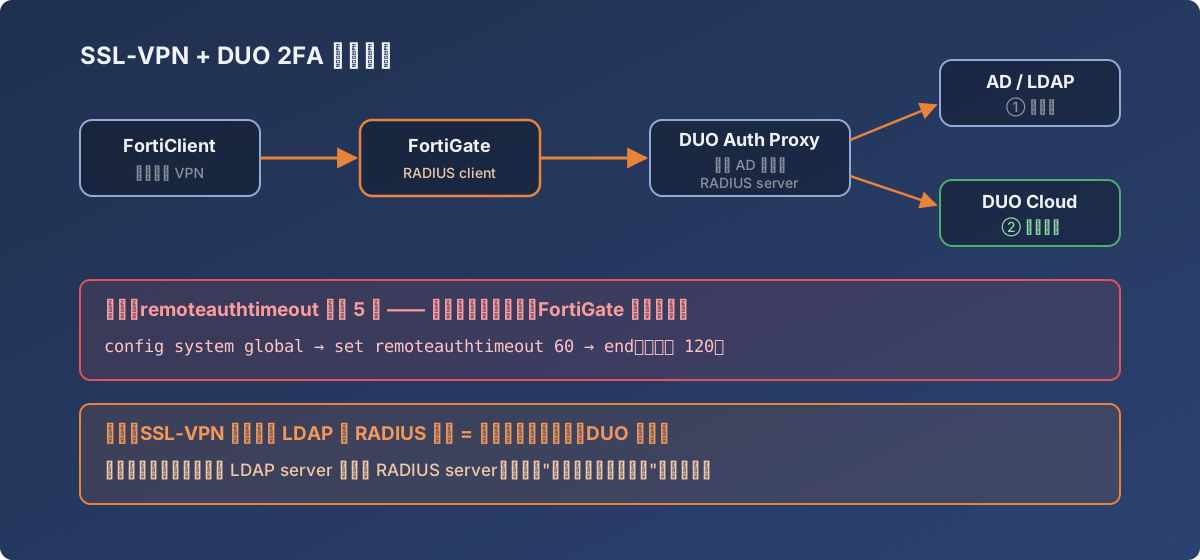
The full chain and where both traps live — both on the FortiGate side
The official docs cover installation well. Two traps, however, you only learn by stepping on them.
Gotcha 1: the 5-second default timeout kills every push
FortiGate’s remote auth timeout defaults to 5 seconds. The DUO push flow is: user starts the VPN connection → phone buzzes → user picks it up and taps Approve — five seconds doesn’t cover it. Result: the password validates fine, but before the user can tap, FortiGate has already declared failure.
The symptom is maximally confusing: wrong password fails instantly (normal), while the correct password “hangs a moment, then fails.”
The fix is CLI-only (no GUI option):
config system global
    set remoteauthtimeout 60
end
DUO recommends at least 60 seconds; we settled on 120 for users whose phone isn’t at hand.
Gotcha 2: LDAP left in the user group = 2FA theater
After configuring the RADIUS server, you point the SSL-VPN user group at it. The fatal detail:
Replace the group’s LDAP server member with the RADIUS server — do not simply add alongside.
With both LDAP and RADIUS in the group, an auth request that matches LDAP sails straight through — right password, you’re in, the DUO hop never happens. The console says 2FA is “configured”; in reality it doesn’t exist. After installing, test it properly: log in with the right password and the phone must buzz. If you get in without a push, you have this problem.
Verification checklist
- Correct password + approve push → logged in;
- Correct password + deny push → login fails (proves 2FA is actually in the chain);
- Wrong password → instant failure (should trigger no push);
- Time a real login end-to-end — connection to push-approval — and confirm it fits inside the timeout.
Lessons
- Any auth chain that involves “a human touching a phone” makes every timeout a suspect. Five seconds is an eternity for machines and barely a beginning for someone fishing out their phone;
- Hardening changes (2FA, ACLs) demand negative testing — “does denying the push block the login” matters far more than “does approving let me in”;
- Plenty of critical FortiGate parameters are CLI-only (
remoteauthtimeoutincluded) — before concluding a setting doesn’t exist, search the CLI reference.